Site Visit Report: Structure, Example and Best Practices (2026)
The document many people write without a method
An estate agent viewing a property, a surveyor recording defects, a maintenance technician checking equipment, a portfolio manager tracking a building over time: they all produce the same thing on the way back from a visit, a set of observations, photos and measurements that have to fit into one clear document. Yet that document is rarely structured. Findings end up scattered across emails, photos stay in the phone’s camera roll, and by the time a piece of information really matters (a dispute, a challenge, a comparison with the previous visit) it is either lost or too vague to stand up.
The site visit report is that document. It is not just for construction: the same format serves a property inventory, a survey, a compliance audit or a maintenance round. This guide gives you a standard structure that adapts to all of those contexts, a worked example on a concrete case, the best practices for handling photos, and a method to produce the report without losing an evening to it.
What is a site visit report?
A site visit report is a document that records, on a given date, the condition of a place and the observations made during a physical visit. It identifies the property or site, lists the people present, describes what was found area by area, backs each finding with one or more photos, and sets out the actions to take. It is written by whoever leads the visit: estate agent, property manager, surveyor, project manager, maintenance technician, auditor or inspection body.
Its value lies in its rigour. A dated, precise, photographed report can be relied on in case of disagreement: it fixes the state of a place at a specific moment, which becomes decisive when a question arises months later. By contrast, a vague report (“some damp marks in the storeroom”) proves nothing and protects no one. The difference between the two has nothing to do with writing talent and everything to do with a structure followed on every visit.
Premises, site, construction: what changes?
Several phrases come up for what is essentially the same document. The nuance is about context, not form.
- Premises visit report. The broadest case. It covers real estate, the rental check-in and check-out, surveying and defect reporting. The visit looks at a building or a unit, and the inventory is often done room by room.
- Site visit report. The language of operations, maintenance and industry. The visit looks at a facility, a technical site or a fleet of equipment, and the inventory follows the equipment rather than the rooms.
- Construction site visit report. The special case of building works. The visit tracks progress, findings are organised by trade, and the document often becomes a contractual record. If that is your situation, our construction site visit report template covers that context in detail, with a Word template to download.
In all three cases you find the same elements: a header, dated observations, located photos and actions to take. Choosing the right label is mostly about speaking your reader’s language.
When is it used?
The visit report is one of the few documents that crosses trades. The skeleton does not move; only the purpose of the visit and the level of detail expected change.
| Context | Who writes it | Purpose of the visit | What changes in the report |
|---|---|---|---|
| Real estate (sales, lettings management) | Agent, property manager | Condition of the property, works progress | Room-by-room inventory, context and detail photos |
| Rental inventory (check-in / check-out) | Landlord, tenant, sometimes an officer | Condition at entry or exit | Exhaustive description, meter readings, agreed notes |
| Surveying and defects | Surveyor, project manager | Recording pathologies | Precise location, measurements, likely causes |
| Maintenance and operations | Technician, facility manager | Equipment checks | Inventory by item, condition, intervention deadline |
| Portfolio management | Manager, conservator | Tracking a building over time | Comparison with the previous visit, evolution of defects |
| Compliance audit | Auditor, inspection body | Regulatory verification | Reference to the standard, verdict (compliant, non-compliant, reservation) |
This versatility is why one tool and one method can serve an estate agent in the morning and a maintenance technician in the afternoon. What makes a good report does not depend on the sector, but on the discipline of the survey.
The standard structure of a visit report
An effective visit report follows a predictable order, so the reader always knows where to find each piece of information. Six sections are enough, whatever the trade.
1. Header. Identification of the place (property name, address), date and time of the visit, conditions if they matter (weather, occupancy), list of those present and absent. Without a precise header, the report loses its value at the first disagreement.
2. Purpose of the visit. One sentence that frames the reading: check-in inventory, defect survey, periodic check, compliance verification. Everything that follows is read in light of that goal.
3. Observations. The body of the report, organised by room, area or item depending on the context. Each observation is dated, located and backed by at least one photo. It is this location that separates a professional survey from a simple list.
4. Photos. Placed next to the matching observation, not relegated to an appendix. Each photo carries a one-line caption and a marker that links it to the plan or the survey.
5. Recommendations or actions. A table listing the follow-ups: what to do, who handles it, by when, with what status. Depending on the context these are called corrective actions, recommendations or reservations.
6. Conclusion and signatures. A short summary, then the block that formalises sign-off by the parties present. For a contradictory rental inventory, both parties’ signatures are what make the record binding.
Worked example (real case)
Here is what a filled-in premises visit report looks like for the check-in inventory of a retail unit before a lease is signed. The numbers in the “Photo” column refer to markers placed on the attached plan.
Header
| Field | Value |
|---|---|
| Property | Retail unit, 180 m², ground floor |
| Address | Unit 4, 22 Mill Lane, Bristol BS1 |
| Visit date | 14/05/2026, 10:00 |
| Author | C. Rawson, property manager |
| Present | Landlord (Mill Lane Ltd), tenant (Belle Vue Studio) |
| Purpose | Check-in inventory before lease start |
Observations
| No. | Area | Item | Finding | Photo |
|---|---|---|---|---|
| 1 | Sales floor | Tiled floor | Two cracked tiles near the shopfront. | P-01 |
| 2 | Sales floor | Shopfront | Silicone seal lifting on the left corner. | P-02 |
| 3 | Storeroom | North wall | Damp mark of about 0.5 m² at the base of the wall. | P-03, P-04 |
| 4 | Toilets | Tap | Slow drip at the mixer tap. | P-05 |
| 5 | Plant room | Distribution board | Compliant, labelling present, nothing to report. | P-06 |
Recommendations
| No. | Recommendation | Responsible | Deadline | Status |
|---|---|---|---|---|
| 1 | Replace the cracked tiles | Landlord | Before entry | To do |
| 2 | Redo the shopfront seal | Landlord | 30 days | To do |
| 3 | Trace the leak and repair the storeroom wall | Landlord | Before entry | To do |
It is this level of precision that makes a report usable. A finding such as “reservation to check” or “damp issue” is exactly what turns a simple disagreement into an evidence-free argument six months later.
Photos and location: what makes the report defensible
In a visit report, the photo is often the most important piece. A written observation can be open to interpretation; a dated, captioned and located photo is almost impossible to dispute. Three rules make the difference.
Place photos next to the observations. The reader should never have to jump between the description on page 2 and the photo on page 9. Every observation line carries its photo, or a clear thumbnail with a reference. Reports where photos sit alongside the findings are consistently processed faster.
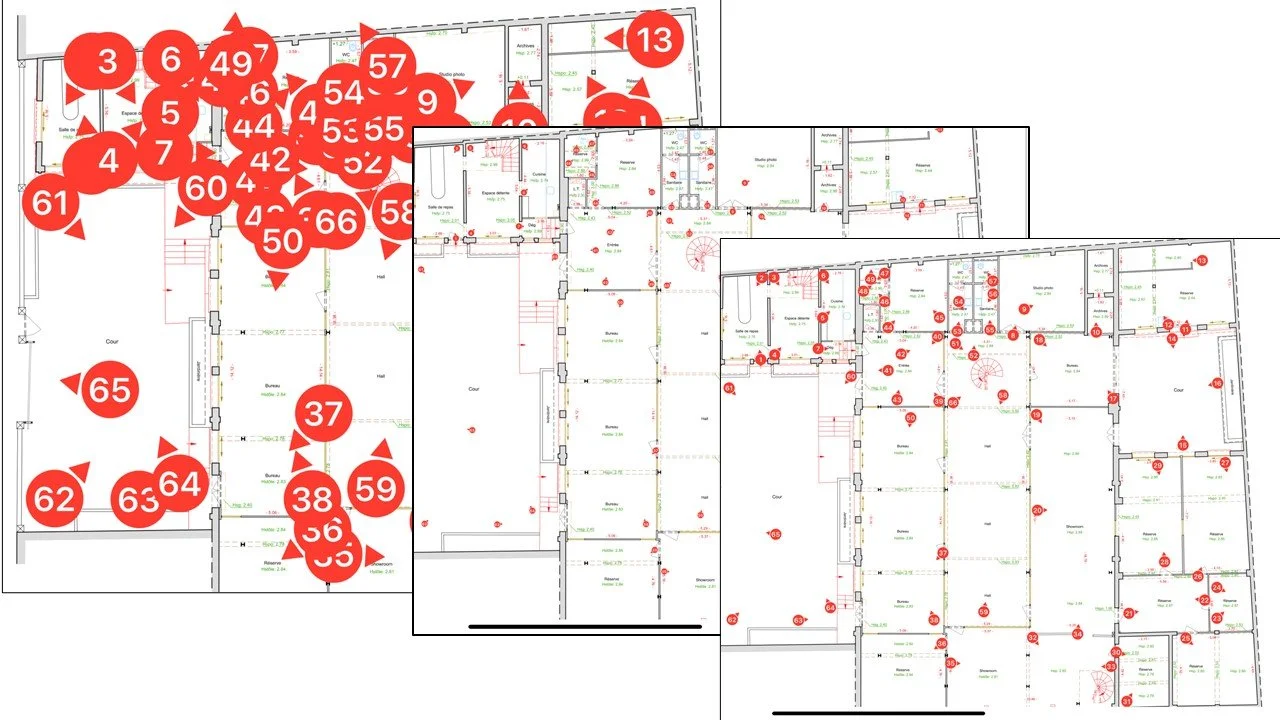
Locate every photo. A photo without a marker forces the reader to guess where, in a building of several hundred square metres, the problem is. Number your photos (P-01, P-02) and place the same marker on the attached plan. It is the single biggest quality differentiator in a visit report, and it matters as much for a retail unit as for an industrial site.
Caption in one line. Date, area, what the photo shows. “Storeroom, north wall, damp mark, 14/05/2026” is enough. Without a caption, a photo loses most of its value as soon as it leaves the context of the visit.
PhotoReport stores each photo positioned directly on the plan: you drop a marker exactly where you take the photo, and that marker stays attached to the image in the project. The link between the finding, the photo and the location is no longer a sticky note that gets lost between the field and the office, it is part of the report.
Adapting the report to your trade
The common core (header, dated observations, located photos, recommendations) does not change. A few adjustments make the report more relevant to your role.
- Estate agent or property manager. Care about the context photos as much as the detail shots. For a rental inventory, add the meter readings and an agreed note signed by both parties. Precision protects the landlord and the tenant alike.
- Surveyor or project manager. Add measurements (dimensions, moisture level, crack gauge) and a likely cause for each defect. A photo of a pathology with no scale or measurement is easy to challenge.
- Maintenance technician or facility manager. Organise the survey by item rather than by room, and give each one a condition and an intervention deadline. The report becomes the entry point of the maintenance plan.
- Portfolio manager. Systematically compare with the previous visit. The same marker photographed on two dates shows the evolution of a defect better than any paragraph.
Whatever the trade, the reflex stays the same: a dated finding, a located photo, a responsible party and a deadline for each follow-up.
Producing the report faster than with Word
A Word template is a good starting point, but it stays a static document. On every visit you copy the photos, resize them, place them next to the observations, write the captions, renumber when a finding is dropped, then send the file. On a visit that produces thirty photos, this formatting can take one to two hours, and it is the first step that gets skipped when time is short. It is also exactly the moment the report loses its usefulness.
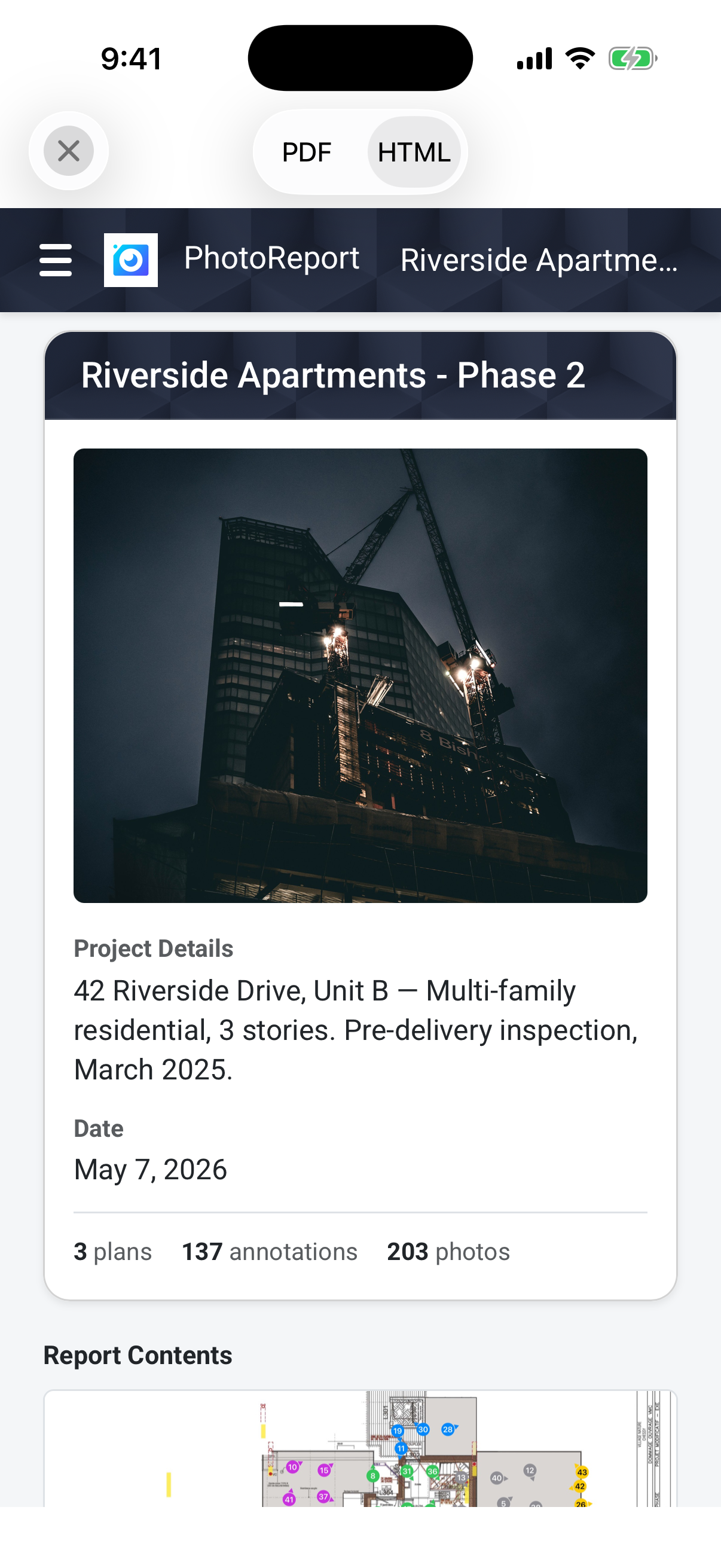
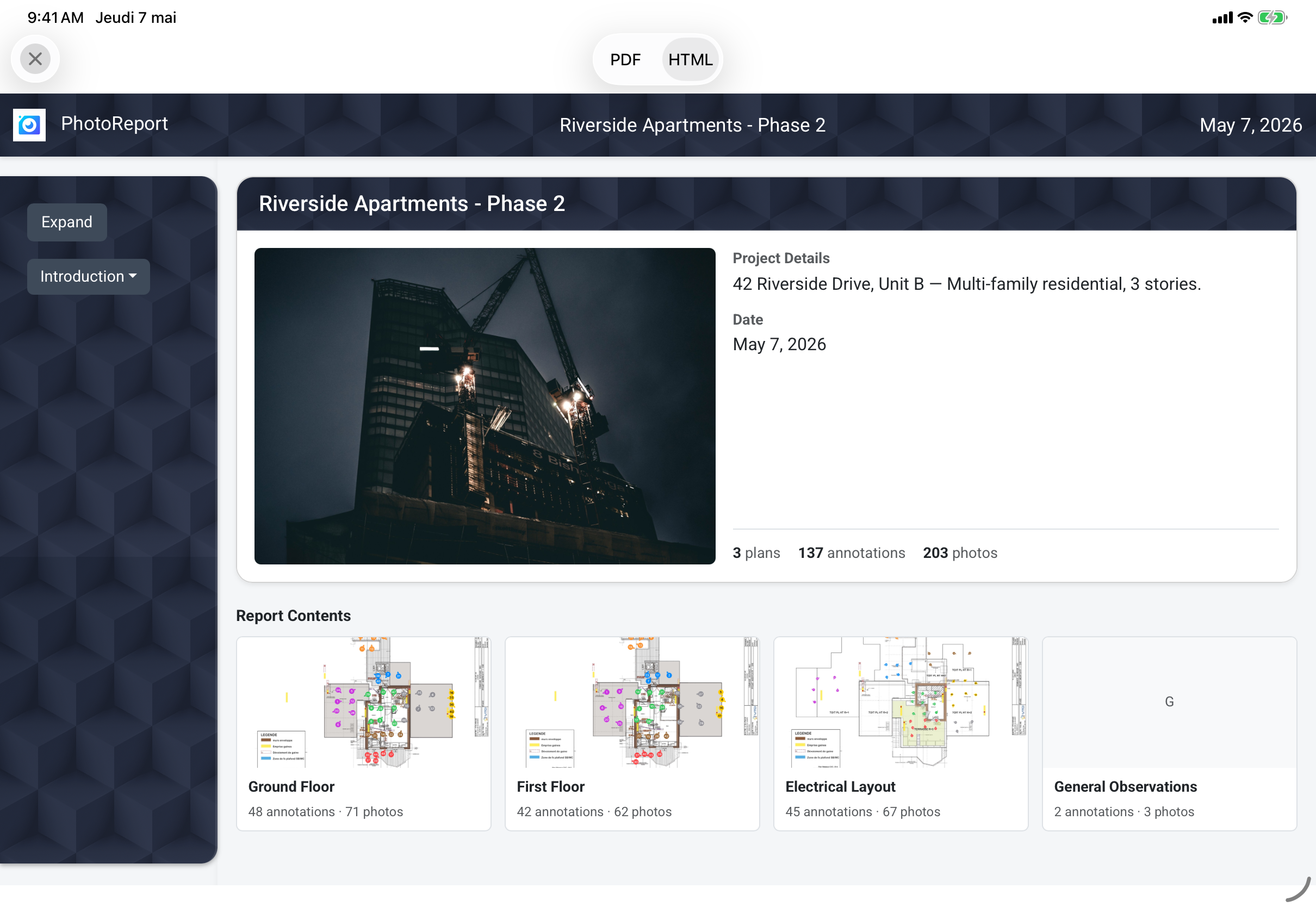
The method that holds up is to capture everything on site, on a single device: you take the photo, drop the marker on the plan, annotate and caption in the same gesture, while your memory of the room is still fresh. The report then generates itself. This is the workflow PhotoReport is built around: photos placed on the plan, annotations drawn on the image, audio comments attached to photos, and a one-tap export to a PDF or a web link the other party opens without installing anything. What took two hours takes a few minutes.
For the step-by-step process, from preparation to distribution, see our guide on how to write a visit report. If your visit is mainly photographic, the essential photos checklist complements this method. And for the real estate case in particular, see our guide to real estate photo reports.
FAQ
What is the difference between a premises visit report and a rental inventory?
A rental inventory (check-in / check-out) is a type of visit report, legally framed for lettings. The premises visit report is the generic term: it also covers surveying, audits, maintenance and portfolio tracking. The structure is the same (header, observations, photos, follow-ups), but the rental inventory requires specific entries and the agreed signature of both parties.
Does a visit report have legal value?
Its value depends on the context and on its rigour. Dated, precise, photographed and signed by the parties present, it can be produced in a dispute to establish the condition of a place on a given date. A rental inventory signed by both parties has strong evidential weight; an unsigned internal report mainly serves as a record and a reference. In every case, precision and located photos are what make the document defensible.
Do you need photos in a visit report?
Yes, and they are what makes the difference. A written observation can be challenged; a dated, captioned and located photo is much harder to dispute. Count on at least one photo per observation, and two or three (wide shot then close-up) when the finding needs context. The constraint is not the number of photos, but how fast you can caption and locate them.
Can you use the same template for a construction site and a retail unit?
Yes. The skeleton is identical: only the labels change. On a construction site you organise observations by trade; in a unit, by room; on a technical site, by equipment. If your need is specifically progress tracking, start from our construction site visit report template, which includes a Word file and a filled-in example on the construction side.
How do you share the report with the parties involved?
Three options. PDF by email, the most common, which works everywhere. A shared folder (Drive, Dropbox, OneDrive) to keep everyone on the latest version. A dedicated tool like PhotoReport, which generates a password-protected web link recipients open without installing anything, with the PDF available to download.
Try PhotoReport on your next site visit
Whether you run a rental inventory, a survey, a maintenance round or a portfolio review, the gain is the same: capture the photos placed on the plan, annotate them, and turn them into a report the same day, without the formatting chore. PhotoReport is built around this workflow on iOS, with located photos, audio comments and one-tap PDF and HTML export.