Annotate your PDF plan directly, like on paper.
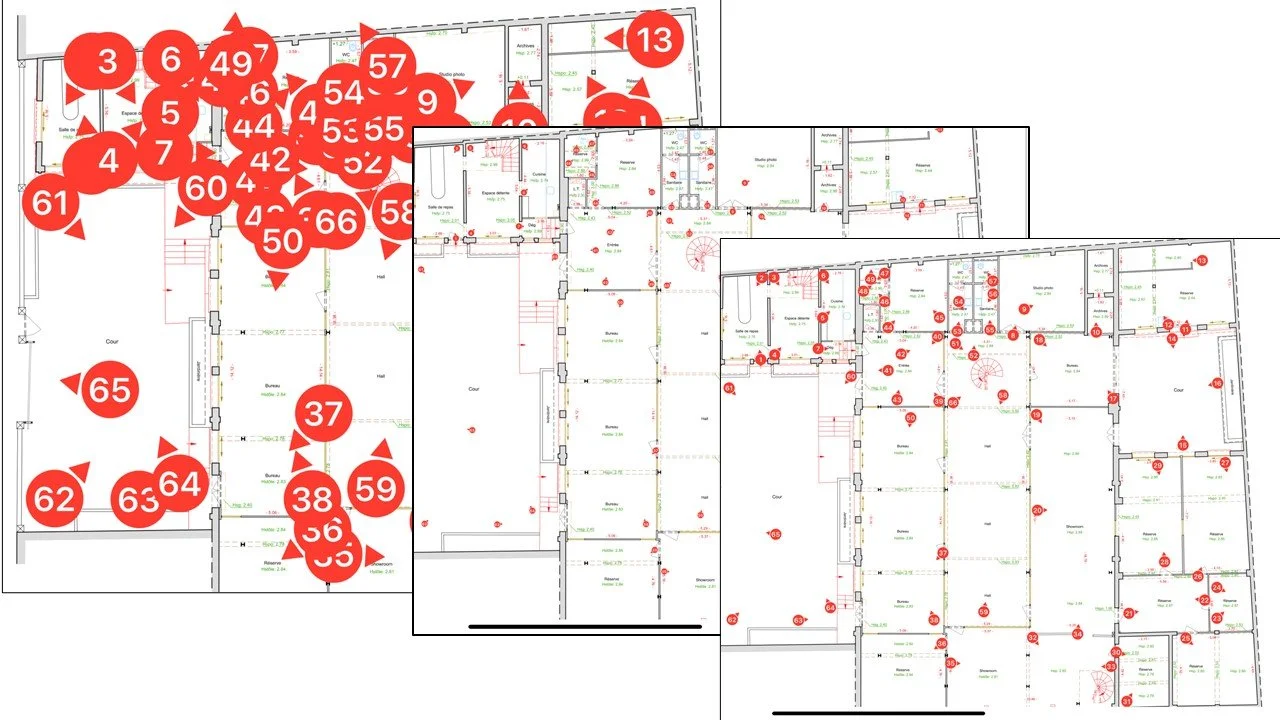
Import the project's plan, drop annotations exactly where you make the observation. HD photo attached, configurable color, free comment. Everything precisely positioned on the plan.
Try freePlan annotation: the cornerstone of a solid construction report
Without an annotated plan, a construction report is a disconnected gallery of photos. With PhotoReport, you import the project's PDF plan (architect, engineering firm, owner), and each observation is dropped at the right spot. Annotation color for categorization, size matched to importance, HD photo attached, free or audio comment. The recipient opens the report, sees the plan, instantly understands where each observation is. No more vague descriptions like "in the back room on the right".
Why annotate on a plan instead of in a list
Precise location
The annotation is positioned exactly where the observation was made. No more vague descriptions or hand-drawn plans.
Instant comprehension
The recipient sees the plan, spots the annotations, taps for the photo. Three seconds per observation.
Visual categorization
Annotation colors and sizes distinguish urgencies, observations, points of attention, validations.
When plan annotation is essential
- Site visit reports (architect, project manager)
- Tenancy inspection (room-by-room defects on the plan)
- Installation records (furniture, equipment positioned on the floor plan)
- Property audits (defect zones on building plans)